Docs
SysModeler — User Manual
8. The Workspace
Opening a project enters the workspace. Its contents differ between v1 and v2, but the layout follows a consistent pattern.
8.1 Layout
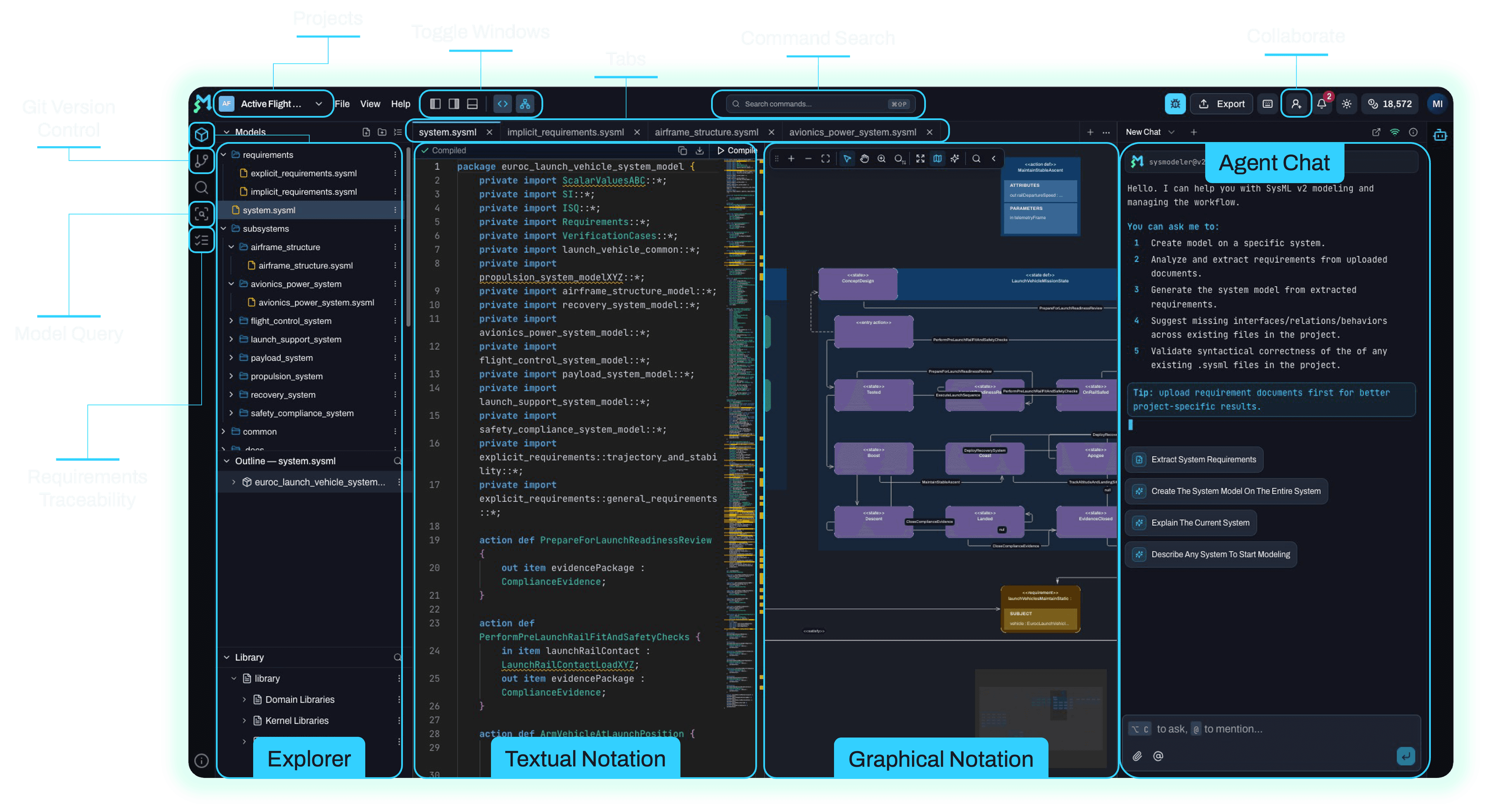
- Title bar — editable project/diagram name, version indicator, Export, Share/Add collaborators, Notification bar, theme switch.
- Left sidebar (icon bar) — toggles panels: Model Explorer / diagram list, file explorer, Library, Query, and Model Search.
- Tabs — each open diagram (v1) or file (v2) is a tab; create, switch, and close them. Open tabs are remembered per project.
- Main area — the canvas (v1) or a split code editor + live diagram (v2).
- Right sidebar — context panels: element/edge properties, alignment tools, canvas controls, and the AI Agent.
- Status area — save status (
saved/saving/pending/error), WebSocket connection health, and presence.
8.2 Toggling panels (focus mode)
Open or collapse panels to focus on code, chat, or the file explorer:
| Panel action | Shortcut |
|---|---|
| Toggle left sidebar (dock Model Explorer) | Ctrl + B |
| Toggle right sidebar (undock Model Explorer) | Ctrl + Alt + B |
8.3 Command palette & search command
Execute features keyboard-first without navigating menus:
- System command palette —
Ctrl + Shift + P(workspace-wide). - Editor command palette —
F1(SysML v2 code editor).
8.4 Multi-monitor support (undocking)
You can undock the AI chat, code, or diagram panels into separate windows to spread work across multiple screens. Re-dock them at any time.
8.5 Keyboard-shortcut cheatsheet
Press Ctrl + H at any time to open the in-app Keyboard Shortcuts dialog. It lists the shortcuts available in the current context and adapts labels to your operating system. See Appendix A for the complete matrix.
8.6 Report a bug
Use Report bug to open the feedback form and submit issues or feature requests directly to the support team (see Section 18).